
Available first on macOS
Professional Imposition Software
ImposePRO
From customer PDF to production-ready press sheet. Impose, number, barcode, QR, and automate through one printshop-focused prepress workflow.
- Build professional flat and N-up PDF impositions.
- Impose saddle-stitch, side-spiral, top-spiral, and perfect-bound booklets.
- Create and verify styled, variable QR codes.
- Apply sequential numbering across flat and booklet jobs.
- Generate Code 128 and Code 39 barcodes in the production workflow.
- Drive numbering, barcodes, and QR content from CSV data.
- Preview resolved content and placement before production-ready output.
- Process production PDFs locally—without cloud upload/download cycles.
Production advantages
Why production teams choose ImposePRO.
Benefits that extend beyond individual features—helping teams reduce handling, improve repeatability, and keep production moving.
Lower prepress labour
Reduce repetitive layout preparation and the manual effort required to impose recurring production jobs.
Faster repeat production
Keep standard imposition, numbering, barcode, QR-code, and booklet tasks inside one focused workflow.
Local desktop processing
Process source and output files on the workstation responsible for the job rather than relying on cloud processing.
Avoid unnecessary file transfers
Eliminate avoidable upload-and-download cycles for large, confidential, or time-sensitive production PDFs.
More booklet production choices
Impose booklets for saddle-stitch, side-spiral, top-spiral, and perfect-bound production.
Low commercial seat cost
Start with ImposePRO alone or combine it with ProofingPRO and EnhancePRO under flexible seat-based pricing.
Not locked to one computer
Each seat represents one active licensed session, rather than one designated terminal, laptop, or operating system.
macOS now; Windows and Linux next
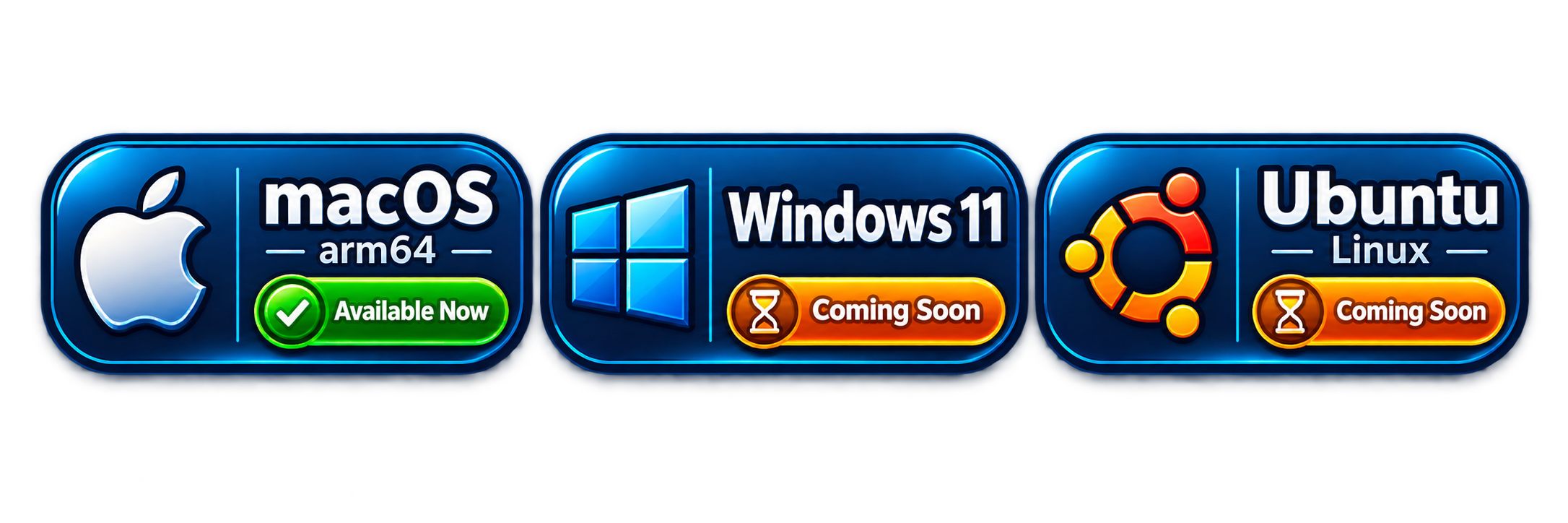
Available now for Apple-silicon macOS, with Windows 11 and Ubuntu Linux versions coming soon.
Production-ready visibility
Review sheet, grid, bleed, placement, progress, and output details before the completed job moves forward.
Capabilities
What ImposePRO is designed to help you do.
From customer PDF to production-ready press sheet. Impose, number, barcode, QR, and automate through one printshop-focused prepress workflow.
Standard impositions
Arrange pages and artwork into practical production sheet layouts.
Booklet imposition for multiple binding styles
Sequence and impose pages for saddle-stitch, side-spiral, top-spiral, and perfect-bound booklet production.
QR-code placement
Add scannable QR codes where the production job requires them.
Sequential numbering
Apply changing number sequences across repeat production items.
Barcode placement
Position barcodes as part of the prepared production output.
Production export
Move the completed imposition toward its final production stage.
Complete printshop workflow
From customer PDF to production-ready press sheet.
ImposePRO brings imposition, booklets, numbering, barcodes, QR codes, variable data, bleed handling, preview, and automation into one focused prepress production system.
Build the press sheet
Arrange customer PDFs as repeat, grid-based, or multiple-up layouts on flexible press-sheet and trim sizes.
Add production intelligence
Apply numbering, Code 128 or Code 39 barcodes, styled QR codes, and CSV-driven variable information.
Preview before output
Review resolved content, placement, sequence, QR safety information, and imposition details before producing the job.
Impose. Number. Barcode. QR. Automate.
Core professional PDF imposition
Turn supplied PDFs into press-ready layouts without rebuilding the job.
Production-oriented controls handle everyday flat work, repeat layouts, trim, bleed, sheet sizing, and placement.
Flexible imposition layouts
- Multiple-up placement on larger press sheets
- Repeat and grid-based layouts
- Multiple placements per sheet
- Automatic job positioning
- Independent Repeat and Blank controls
Production-aware sizing
- Respect existing PDF trim and bleed
- Configure bleed when the job requires it
- Handle supplied files with or without bleed
- Build sheet layouts from finished trim dimensions
- Use flexible sheet and finished sizes
Made for commercial jobs
Prepare business cards, postcards, flyers, tickets, labels, menus, signs, and other recurring print products with a repeatable workflow.
Take the customer PDF straight toward a production-ready sheet.
Booklet production
Produce bound work without manually calculating page order.
ImposePRO supports saddle-stitch, perfect-bound, side-spiral, and top-spiral production for manuals, programs, catalogs, booklets, and bound documents.
Multiple binding workflows
- Saddle-stitch
- Perfect-bound
- Side-spiral / coil-bound
- Top-spiral / coil-bound
Automatic page preparation
- Automatic page ordering
- Automatic booklet pagination
- Required blank-page insertion
- Logical-page to imposed-page transformation
Sequences stay logically correct
Variable information is assigned before booklet imposition, so automatically generated padding pages do not incorrectly consume sequence values.
Sequential and variable numbering
Impose, number, and produce the complete job in one workflow.
Generate dynamic sequences and place them accurately through flat layouts and booklet workflows.
Control the number series
- Starting and ending number
- Quantity and step / increment
- Prefix and zero padding
- Dynamic sequence generation
- Correct handling through imposed layouts
Position each variable element
- X/Y positioning
- Rotation
- Per-placement control
- Correct sequence flow through booklets
Number real production jobs
Produce event and raffle tickets, coupons, certificates, parking permits, membership cards, admission passes, serialized labels, and production-tracking pieces.
Integrated barcode generation
Create production barcodes without a separate artwork-generation step.
Generate Code 128 and Code 39 barcodes from production data, then place and rotate them directly within the imposed job.
Code 128 and Code 39
Choose the barcode format appropriate to the job and generate it during production.
Use sequential or supplied values
Build barcode content from sequences or production data instead of pre-generating thousands of separate barcode graphics.
Place it where the job needs it
Control placement and rotation, combine barcodes with numbering, and use them in flat or booklet workflows.
Professional QR-code production
Design it. Verify it. Impose it. Print it.
Create practical business QR codes, style them for the job, and review production-safety information before output.
Support useful business actions
Generate website, text, email, telephone, SMS, Wi-Fi, vCard, event, geographic-location, WhatsApp/social, app-store, CSV-driven, and mixed text-plus-CSV QR content.
Control the QR appearance
Configure body, eye-frame and eye-ball shapes; foreground and background colours; size; position; alignment; rotation; error correction; quiet zone; and an optional centred logo.
Check before production
Use live preview, contrast evaluation, matrix and module information, printed module-size evaluation, automated decode verification, and warnings for potentially unreliable configurations.
CSV and variable-data production
Turn job data into unique imposed pieces.
Import CSV records, combine supplied information with fixed text or sequences, preview individual records, and apply variable content in logical-page order before imposition.
Bring in production records
- Import job data from CSV
- Display record counts
- Preview individual records
- Use practical delimiters, including |
Build resolved variable content
- CSV information plus fixed text
- Variable data plus sequential numbering
- Variable QR codes
- Variable barcodes
Keep logical order intact
Apply variable content to logical pages before imposition so the correct record follows the correct piece through flat and booklet production.
One integrated production pipeline
Combine imposition, numbering, QR, barcode, and variable data.
Build the complete job in ImposePRO instead of moving variable elements through disconnected applications.
Artwork → 12-up → sequence → QR/barcode → output
Generate ticket numbers, create corresponding codes, position the variable elements, and produce the complete sheet.
Data → logical pages → pagination → imposed sheets
Create serialized booklets, booklet-specific QR codes, tracking numbers, barcodes, and other logical-page identifiers.
Blank pages do not consume values
Automatically inserted booklet padding remains outside the numbering and variable-data sequence.
Live production preview
See what will be produced before you print it.
Inspect the resolved production intent before committing the job to final output.
Preview resolved values
Review QR content, variable records, sequences, and other resolved production information.
Verify layout intent
Review placements, page handling, and imposition details before the production file is written.
Review QR reliability signals
Inspect QR safety information and warnings while there is still time to adjust the configuration.
GUI for operators + CLI for automation
Use visual controls at the production desk. Use the CLI for repeatable automation.
ImposePRO supports everyday operator work and can grow into scripted production environments.
Production-friendly visual workflow
Work with focused controls, appropriate defaults, tooltips, and live previews—without requiring command-line knowledge.
Scriptable and repeatable
Run repeatable production commands, batch workflows, and workstation or server-side automation.
A foundation for automated flow
Use the CLI as a foundation for printshop automation and hot-folder-style integration workflows.
Local production-file processing
Your production PDFs stay on your computer.
ImposePRO processes production files locally, so large, image-heavy, confidential, or time-sensitive jobs do not need to be uploaded to a cloud imposition service and downloaded again.
Avoid transfer delays
Start processing without waiting for large customer files to travel through a browser-based service.
Reduce unnecessary data transfer
Avoid repeated upload and download cycles solely to prepare a production layout.
Local files; connected licensing
Production-file processing remains local. Internet connectivity may still be used for appropriate licensing and service functions.
Cross-platform printshop deployment
Your printshop. Your workstation. Your operating system.
Deploy on supported desktop platforms as releases become available, with active-session seat licensing that is not permanently tied to one computer.
macOS
Available for Apple Silicon / arm64.
Windows 11
Windows support is on the ImposePRO release roadmap.
Ubuntu Linux
Ubuntu Linux support is on the ImposePRO release roadmap.
Production output formats
Create production PDFs and the QR assets your workflow requires.
Choose vector output where appropriate or raster output when required by the job.
Production-ready PDF
Create imposed PDF output for press-sheet production.
PDF, EPS, SVG, PNG, and JPEG
Export QR assets in PDF, EPS, PNG, JPG/JPEG, and SVG where supported.
Vector or configured raster output
Retain vector output where appropriate and configure raster resolution when a raster format is required.
What can you produce?
Recognizable printshop jobs—not abstract feature lists.
Use ImposePRO across the everyday work handled by commercial print and production departments.
Repeat and N-up production
Business cards, postcards, flyers, labels, menus, signs, and other trim-and-bleed work.
Unique pieces and codes
Tickets, raffle tickets, coupons, certificates, parking permits, membership cards, event badges, admission passes, and tracking pieces.
Booklets and gathered work
Programs, manuals, catalogs, saddle-stitched booklets, perfect-bound documents, and side- or top-coil-bound work.
Fewer separate applications
Reduce handoffs, copy-and-paste work, and opportunities for mistakes.
Where the job uses ImposePRO capabilities, replace a chain of disconnected preparation tools with one focused path.
PDF → spreadsheet → generators → graphics → imposition
Every handoff adds setup time, manual positioning, and another chance for production information to drift.
Customer PDF → ImposePRO → production-ready PDF
Keep layout, sequence, barcode, QR, variable data, preview, and output in one production workflow.
Faster, more repeatable setup
Use fewer applications, reduce manual intervention, and standardize recurring work.
Designed around small and medium printshops
Professional prepress automation without enterprise complexity or enterprise pricing.
ImposePRO is shaped around practical production needs, focused operator workflows, and accessible commercial-use licensing.
Independent and digital printshops
Support owner-operated printers, commercial shops, copy/print centres, and franchise print locations.
Sign, graphics, and focused production
Fit the repeat, variable, code, and output needs of sign and graphics shops and small production departments.
Internal production teams
Give in-plant print departments a focused tool for repeatable everyday work without an enterprise workflow burden.
Fast adoption and task-focused learning
Learn the job you need to produce.
Use real ImposePRO screens and guided production examples instead of relying on generic claims that the software is easy to use.
Imposition and booklet tutorials
Learn flat, N-up, trim/bleed, saddle-stitch, perfect-bound, and spiral-bound workflows.
Numbering, barcode, QR, and CSV tutorials
Follow task-specific demonstrations for sequences, codes, styling, safety checks, and variable records.
Examples organized around print jobs
See the relevant controls in the context of tickets, labels, booklets, cards, and other recognizable production work.
Trial before commercial subscription
Try ImposePRO on your own print jobs.
Evaluate the workflow with familiar customer files, then subscribe for licensed commercial use when you are ready—without requiring a sales call, scheduled demonstration, or quotation process.
More than an imposition engine
ImposePRO is a printshop-focused prepress production platform for the everyday flat, bound, serialized, coded, and variable jobs commercial printers produce.
Product screenshots
See the workflow before you install.
Explore the ImposePRO workspace, focused production controls, and representative output from a completed imposition job.
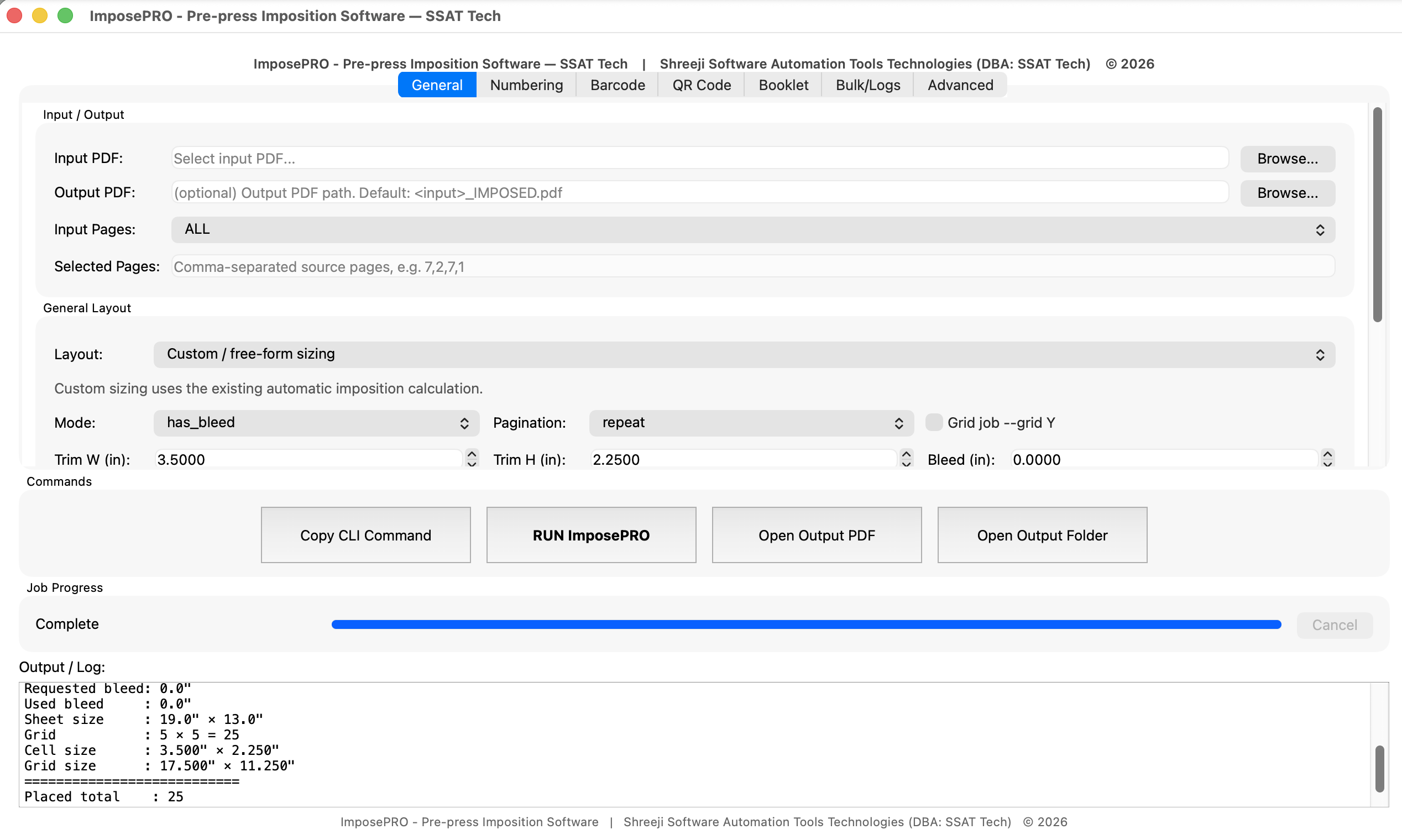 Screenshot 01
Main workspace
General input/output, layout configuration, job progress, and production output log.
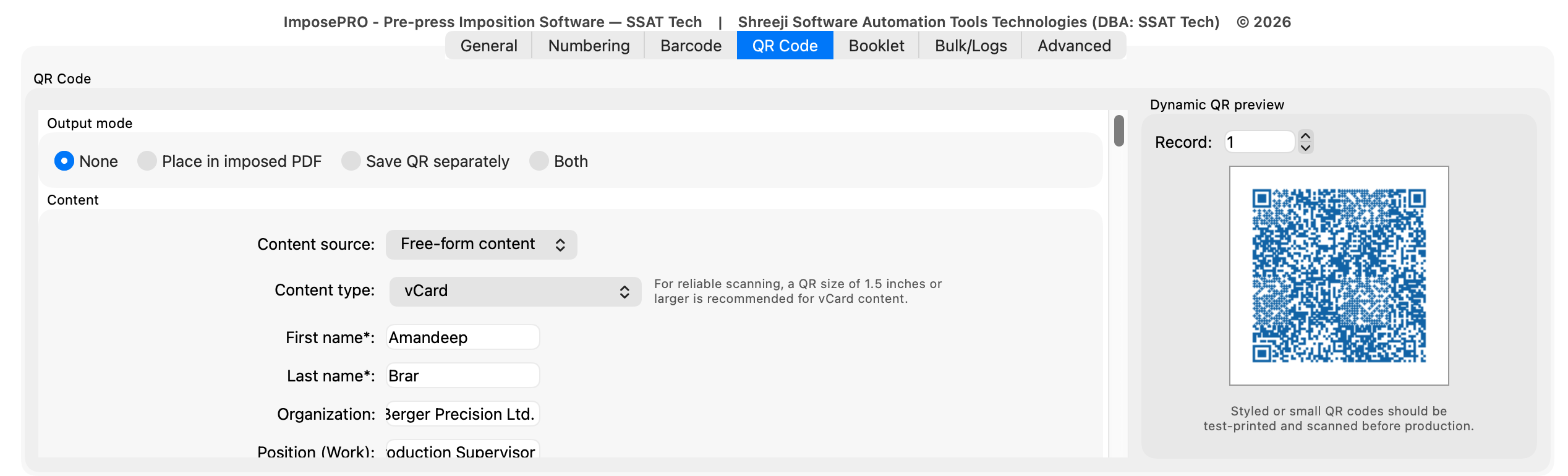
Screenshot 02
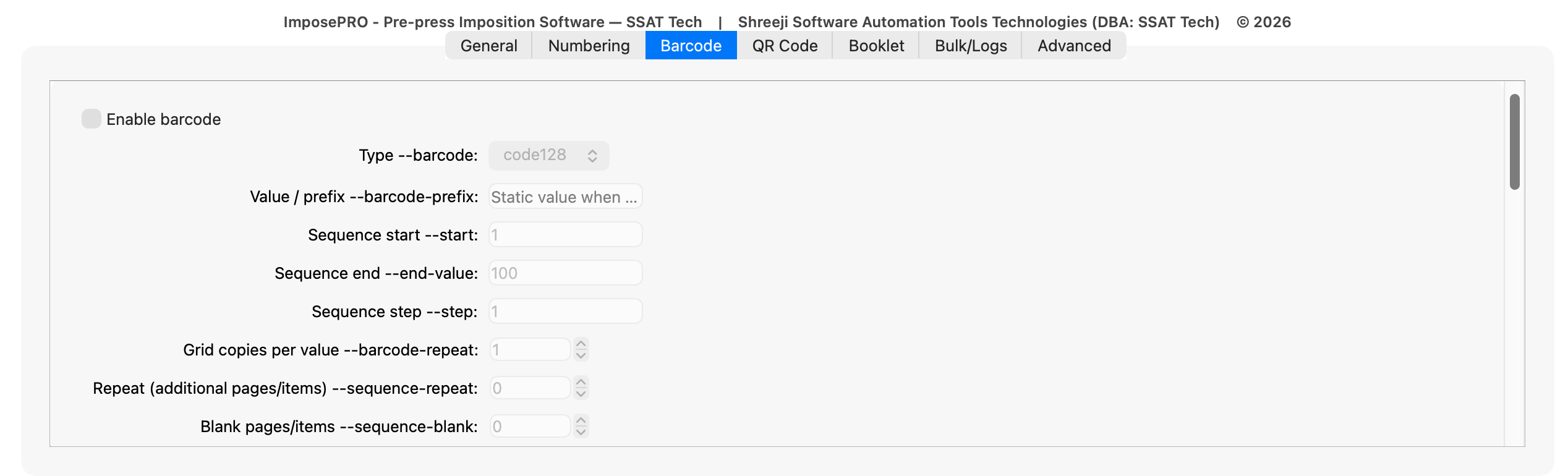
Focused task controls
QR-code generation and barcode sequencing controls.
 Screenshot 03
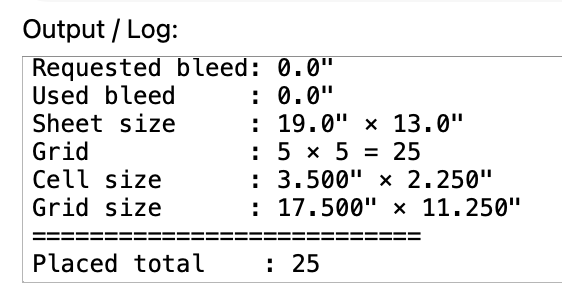
Result / output view
Production output log with sheet, grid, bleed, and placed-item details.
Tutorial-led support
Learn ImposePRO through practical work.
Product-overview and task tutorials will use real screens, guided zoom and pan, highlighted controls, before/after views, and synchronized narration.
- ImposePRO product overview
- Create a standard imposition
- Build booklets for saddle-stitch, side/top-spiral, and perfect binding
- Add QR codes
- Sequential numbering and barcode placement
- Export production output
Works well with…
A connected SSAT Tech workflow
Relevant tutorials will point to complementary SSAT Tech products when their features naturally support the task being taught. Explore Tutorials / Learn